Lifelong Learning a blog of all the things I've learned about…

1Aug/106

IKEA Lampan RGB LED Light

A few months ago, I saw this blog and video. The gentlemen had hacked a Lampan light from IKEA with LEDs, I was immediately enamored with the idea of building it and giving a few of them to my young nieces for Christmas. I figured they'd be far more excited about a one-of-a-kind light than a few more dolls in the 'ole toy box.

I also wanted to further my design knowledge of PCBs as well as better understand using PWM in AVRs, until this point I'd really only played with my Arduino and a few ATTiny13s. I quickly came up with the following design to suite my requirements.

My Requirements:
1. AVR with at least 3 PWM channels. (I used the ATTiny2313)
2. Super bright RGB LEDs.
3. Warm white light for normal use, not the normal blue hued white LEDs.
4. In-circuit programmable design.
5. Fit in the base of an IKEA Lampan.
6. UL approved power source.

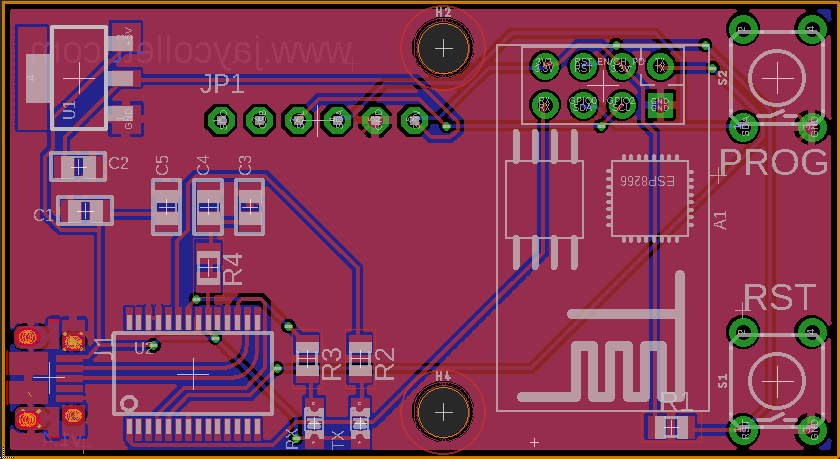
First Version of my Lampan RGB LED PCB

Lampan RGB LED PCB

I used quite a few surface mounted components to get the size down.

The lamp uses a single momentary button to switch (you need special drill bits to drill the hole in this thin plastic, trust me, check Harbor Freight for them!) between the colors and the two color mixing modes (one, I jokingly refer to as "light switch rave" and the other a slow color changing mode). My wife absolutely hates the blue hue of normal LEDs, so I knew my design would have to incorporate a few warm white LEDs in addition to the RGB LEDs, thus the 3 warm white LEDs in the middle of the board.

I got the 5mm RGB LEDs from here, highly recommended! And yes, I did use a single resistor for each color, typically a no-no in design, but the trade-off was worth it for me. I wasn't overly concerned with exact color intensity from each LED.

A view of the different modes, from warm white through color fade...

View of the LED modes with the light shade off...

Anyhow, this was a fun build and Christmas was a hit, the family loved them. I've attached the Eagle schematic and AVR Studio files to the post if anyone is more interested in the design.

Title: LampanRGBLedSchematic
Caption: Lampan Eagle Schematic and Board Files
File: LampanRGBLedSchematic.zip
Size: 34 kB
Title: LampanRGBDriver
Caption: Lampan RGB Firmware
File: LampanRGBDriver.zip
Size: 3 kB
30Jul/101

Nursery Room Temperature Monitor

Temperature Monitor Indicating it's too warm

Temperature Monitor Indicating it's too warm

Let me start by saying I found out a few weeks ago that I'm going to be a father. This is my first child and as you can imagine I'm filled with excitement and nervous energy. Both my wife and I both agreed that we wouldn't start actual preparations for the coming baby until the 12th week to ensure all was well (1 in 4 pregnancies end in miscarriage). I just couldn't sit still and wait, I started reading about what to expect, how to care for a newborn, and so forth.

It was while I was reading about SIDS (sudden infant death syndrome) that I saw a few articles discussing the proper temperature for a nursery to help prevent the SIDS. The articles all agreed that cooler was better, ideally between 64 and 74 degrees Fahrenheit.

I was immediately struck by the idea of creating a visual indicator to allow both my wife and I to easily ensure the room was within this range! I grabbed up my Maker's Notebook and starting drawing what I was envisioning. What did it look like, you ask? Keep reading, you'll soon be rewarded with the answers you seek!

My idea was to utilize a diffused RGB LED, an analog temperature sensor (really wanted to expand my working knowledge of the ADC on AVRs) and a frosted glass sphere to create a highly visible temperature indicator. I quickly sorted through my parts bins and found most of what I would need. A quick search on eBay and a short drive to Lowe's provided the rest.

Here's what you'll need to build one yourself:
1. Wooden base, use your imagination.
2. Frosted glass light shade.
3. LM335 Analog Temp Sensor
4. Atmel ATTiny45/85 micro and appropriate socket.
5. Common anode RGB LED (doesn't have to be diffused, you can do that yourself with sandpaper).
6. Two (82 ohm) , one (150 ohm), one (10k ohm) and one (2.2k) 1/4 watt resistors.
7. A 10k potentiometer.
8. One (.1uF) capacitor.
9. A power source. I used an old Netgear router power supply. 5V regulated output at 2.0A.
10. Some wire, heat shrink tubing, Velcro and appropriate soldering equipment.
11. Firmware and schematic.

I typically breadboard all my designs then move them to PCBs once I've worked out all the kinks, but I had recently purchased a mini drill-press and PCB development kit from Jameco and decided the simplicity of this design would allow me to go directly to a DIY PCB (it also gave me an excuse to try my new drill-press and development skillz).

Bottom of Nursery Room Temp Monitor PCB

Bottom of Nursery Room Temp Monitor PCB

PCB for Nursery Temp Monitor

I quickly designed, developed and drilled my new PCB and set to work populating it with all the components.

NurseryRoomTempMonInBase

The PCB sitting in the wood base (routed out the circle for the globe to sit in)

Had to calibrate the temp sensor using the 10k pot and my Fluke with attached thermocouple.

Once done, I sat down and wrote up the firmware using AVR Studio 4. After a few more hours, I was all set to try it out. And TADAAA! A fully functioning accurate temperature indicator for the new nursery. I'll paint the wooden base once we decide on colors for the nursery!

Just finished holding the sensor in my hand to warm it up. This show the sensor cooling down and turning the LED white.

A few equations that made my life easier and an excellent article to extend your understanding of the ADC in any AVR:
AVR Freaks (ADC For Newbies)
Convert Kelvin to Fahrenheit

Title: NuseryRoomTempMonitorFirmware
File: NuseryRoomTempMonitorFirmware.zip
Size: 3 kB
Title: EagleSchematic
File: EagleSchematic.zip
Size: 22 kB
Filed under: AVR, Electronics 1 Comment
19Jul/100

Tasty Home Medicine

Today, I decided I would try my hand at a simple Irish home remedy that turned into a popular soft drink. GINGER ALE! Ginger ale was used some time ago to treat anything that ailed you but now thanks to John McLaughlin, it's more commonly associated with a refreshing soft drink.

Ginger has long been used to help settle upset stomachs and ease nausea, it's these proposed properties that really made me want to give it a try. My wife has been suffering from nausea quite badly lately and I thought this would be a fantastic solution (if it works). It's all natural and quite easy to make.

Here's my recipe for Ginger Soda:
• 2 Cups Fresh cut ginger (slice into about 1/8 inch slices)
• 2 Cups filtered water
• 2 Cups white sugar
• 1 tsp Pure Vanilla Extract
• 2 tsp Dry Ginger Powder (not required but adds to the zippyness)

Combine the ginger, sugar and water and heat until simmering. You'll simmer the mix until the liquid has reduced to about 1/2. It'll be syrupy in consistency. Add the vanilla and dry ginger powder and stir well. Remove from heat and strain mixture. Let the syrup cool to room temperature and then add about 3 tablespoons syrup to 16 ounces soda water (this will vary on individual tastes), stir well and enjoy! If you want, you can add a bit of fresh Mint and a squeeze of lime to zest it up a bit!

But WAIT! Don't throw away that ginger! It will make a fantastic treat and here's how. Take the cooked ginger from the recipe above and mix it well with 1 cup white sugar. Make sure each slice is liberally coated with sugar.  Place the coated ginger slices on a cookie tray evenly spaced out and put in a preheated oven at 225F. Let them dry for about 3 hours in the oven, they should be dry but still chewy! Yum-O!

Ginger slices ready to simmer.
Ginger ready to go!

Ginger ready to go!

Candy ginger ready to dry

Candy ginger ready to dry

Candied Ginger

Candied Ginger

Filed under: DIY Projects No Comments
24Jun/100

1938 RCA 96T Radio

I finally received my vintage radio today. I had purchased it as a "non-working" radio and really only wanted the wood case for one of my other projects which I will talk about later when I get it completed. Anyhow, I couldn't resist looking through all the amazing components and it wasn't long before I started wondering how such a fantastically built radio could be broken... The tubes looked good and it wasn't until I pulled them out to clean them up that I noticed a loose wire which was easily fixed. Well, after an hour and half, I've got the old radio working! I never planned on refurbishing it, now I am thinking twice. It's an all-American, beautiful piece of history and I almost feel drawn to bringing her back to her full potential....more to come....

23Jun/100

Paracord Dog Collars

Man's best friend is a saying that couldn't be any truer than it is in my house! Recently, Rox, the monarch of our pack had bladder surgery to remove some stones. Poor dear has had a rough time recovering so I thought I'd try to cheer him up with a new paracord dog collar. These collars, also known as soloman's bars have been on my learning radar for some time now and I could learn how to make these while cheering up my boy Rox, let's do it!

I actually made two and should finish up the last tomorrow. Can't leave out the other dogs after all..I've attached a few pictures at the bottom of this post of the finished product, solid blue and a two-tone, which I really liked!

Tagged as: No Comments
7Jun/100

.38 Special Reloads

.38 Special Brass, Deprimed and trimmed.Well, this weekend I had planned on knocking out some 12GA shot-shells but found that I had failed to restock my shot, oh well. Our local Sportsman's Warehouse reopened and while I was there this weekend, I picked up some Hornady Critical Defense for my .38 special. The ammo has fantastic reviews and even better specs but at $23 for 20 rounds, I decided it was time to sit down and build myself a equally fantastic self-defense load. I've triple checked the cases, length, thickness, pocket uniformity, etc. Ready to start working up some loads this week!

7Jun/100

A new look for my blog…

Well, I've decided to update my blog and migrate away from my existing blog software, b2evolution to WordPress. I just think WordPress is easier to use and has a much larger user base which means more frequent updates and better plug-ins, themes, etc. I've imported all my old post but will have to go through them and clean up the issues from the import so the site will be wonky for a few days...

21May/100

The Stirling Engine

Stirling EngineSo over the last couple of days I'm been reading about these engines. Fascinating and yet so simplistic my mind goes crazy with cool things I could use it for. Well, not necessarily the most useful things, but cool none the less. One of the videos I watched actually showed a guy who had made one of these engines with soda cans and it ran really well! I'm thinking maybe I can put one of my Arduinos to use with this engine and some sensors....hmmm, I think I've got my next project! More to come...

24Mar/100

Oh how I love CISCO…

CISCO PIX 501

With the recent addtion of my FreeNAS box and my obsession with being able to listen to my music at work or anywhere for that matter, I decided to purchase a CSCO PIX 501 for my home network. The idea is that it would help dust off my IOS CLI skillz and allow me to VPN into my home network from anywere with an acceptable level of security. I got my PIX off eBay and decided to drop the bucks to get a 50 user license version. Compared to what these sold for new, they are a steal now! I quickly got the unit up and running and was able to establish VPN connectivity from work. Unfortunatley the iPhone IPSEC won't work with my PIX, stupid freaking Apple and CISCO must be in coherts to get everyone on the newest and best hardware...bummer.

Anyhow, as I write this post, I have FireClient up and am streaming music from my FreeNAS box at home! WOOT!

24Mar/100

My FreeNAS Build (Part 2 of 3)

FreeNAS LogoOk, so I started sourcing the parts for my new build and realized I had a few more decisions to make before I pulled the trigger on this build.  I had already roughly calculated how much space I wanted/needed. I needed to decide on some of the more technical aspects of the build, like what type of boot drive/system was I going to use, how big should it be? Do I need a gigabit network adapter and if so what kind should I get, will it support jumbo frames and do I need to invest in a server class NIC for ultimate reliability? Luckily for me some of these decisions were made for me when I opted to buy the somewhat gutted Dell XPS 400 from my co-worker. It already came with a gigabit network card onboard, 1GB RAM and SATA ports. It also only had room for (4) internal hard-drives.

I decided I'd just hit up my favorite online retailer and see if I could source all the parts I needed new from them and get what I couldn't there, on eBay. Here's what I ended up with as the foundation of my FreeNAS build:

  1. Dell XPS 400 Tower with built-in Gigabit NIC, 1GB RAM, 3.2GHz P4 Processor. $50 US.
  2. Cheap-o PCI-X video card I had laying around (the mobo didn't support AGP). FREE
  3. Adaptec 2610SA SATA RAID card from eBay, I paid $41 US for it.
  4. Lexar 2GB 80X CF card from eBay, got this gem for $15 US.
  5. (4) Western Digital WD5000AAKS 500GB hard drives from Newegg.com (59.99/each) $223.96 US for all drives.
  6. SYBA SD-ADA40001 SATA II To Compact Flash Adapter from Newegg.com. $15 US.

So my total for this build was a cool $344.96 US. Given the amount of space I'm getting and the quality of the hardware, I don't think I could have found anything prebuilt/off the shelf that would come close to this build. Not to mention the satisfaction of sourcing all the parts and building it myself.

In my next post, I'll go over the actual build and configuration of the FreeNAS software as well as my first impressions of the finalized solution.

Tagged as: No Comments
Page 1 of 612345...Last »